
My actual machine, the one I build this whole article around, is a plain office desktop. Intel Core i5, integrated graphics, 16GB of RAM, no dedicated card in it at all. It borrows its video memory straight out of system RAM, and that one fact explains most of what follows.
If you're on an AMD Ryzen chip with a Radeon iGPU built in, you're in the same conversation, just usually a notch stronger. If there's an old entry discrete card sitting in a drawer somewhere, better still. I'll flag where that changes things, but the target for this piece is what's realistic on the floor itself: a stable 30fps in demanding open-world games, a stable 60fps in lighter or older ones, at 1080p, with the render scale usually sitting below native rather than at it.
TL;DR
Setting | Set it to | If you are still short on frames |
|---|---|---|
Render scale / internal resolution | 67% of native (Quality-equivalent scale) | 50% (Performance-equivalent scale) or lower |
Upscaler (FSR / XeSS Super Resolution) | FSR Quality, or XeSS Quality where FSR isn't offered | FSR Performance / XeSS Performance |
Frame generation | Off | no lower fallback |
Shadow quality | Medium | Low or Off |
Ambient occlusion | Low | Off |
Volumetric lighting / fog | Low | Off |
Crowd / population density | Medium | Low |
Texture quality | Medium | Low |
Tone-Mapping Midpoint | Leave at default, adjust to taste | no lower fallback |
Resolution and upscaling do more than any single graphics setting
If I could only touch one slider on this machine, it's render scale. Pixel count is what shared memory struggles with, so cutting the number of pixels the GPU has to draw does more for frame rate than any individual quality setting ever will. I drop internal resolution to roughly two-thirds of native first, and if that's not enough, I take it down to half. Those two numbers aren't arbitrary, they line up with what most Quality and Performance upscaler presets already use internally, so you're picking the same ratio the game's own menu would pick for you.
Which upscaler you use matters more than which vendor made your hardware. FSR works across Intel, AMD and Nvidia hardware alike and doesn't need anything special to run, which makes it the one nearly everyone on this hardware class can actually turn on. The current public FSR 3 branch sits at version 3.1.5, and that's worth knowing because plenty of games still show FSR 3 or FSR 3.1 in their menu even though AMD's newer marketing has moved further ahead on supported hardware elsewhere. If a game doesn't offer FSR, XeSS Super Resolution is the fallback I reach for. It's widely supported outside Intel's own cards, even if Intel's newer XeSS 3 multi-frame generation branding is really aimed at Arc and Core Ultra hardware, not an older office iGPU. DLSS I mention only so you stop looking for it, it needs an actual RTX card and isn't something this floor, or an AMD APU, can ever switch on.
Frame generation I leave off, and not because it doesn't work. It wants a base frame rate that's already decent, somewhere around 45 to 60fps, before it starts feeling smooth rather than smeared. This hardware class is usually fighting to clear 30fps in anything demanding, so turning frame generation on here just doubles a bad number into a worse-feeling one.
Shadows are the next thing I cut, every time, without much thought. They cost far more than they visually give back on weak hardware, and I've never once missed the sharper edges mid-game. Ambient occlusion goes the same way, down to Low or off. It's an easy source of real frames and the scene barely loses anything you'd notice while actually playing rather than screenshotting. Volumetric fog and lighting I also drop low unless a game is already comfortably clearing my target, because atmospheric haze is expensive for what is, at the end of the day, just fog. Crowd density is worth a look too in busy city games. Thinning out a packed street eases both the CPU and GPU at once, though I treat it as a smaller lever than the four above.
What Cyberpunk and Black Myth actually look like here
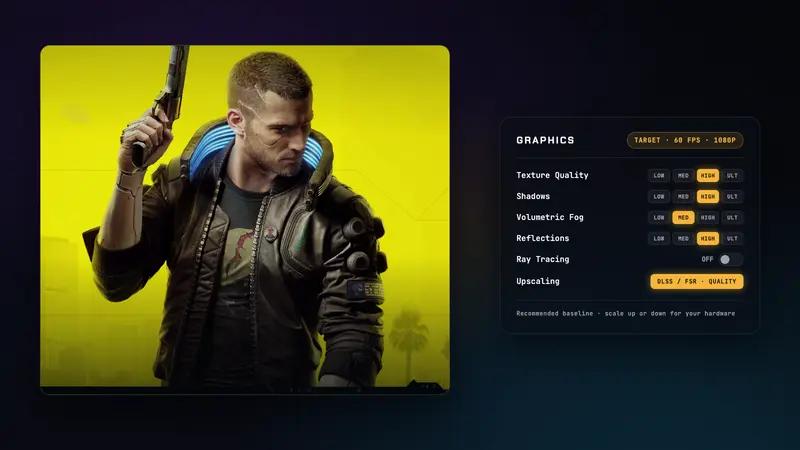
Cyberpunk 2077 is the clearest illustration of what tuning buys you on this hardware class. A comparable Iris Xe laptop running 1080p Low native sits in the mid-20s, roughly 24 to 25fps. Turn on FSR Quality and drop the internal resolution along with it, and the same scene climbs to about 33 to 34fps. That's the entire argument for upscaling in one comparison, the difference between a game that technically launches and one you'd actually sit down and play. Patch 2.3 added FSR 3.1 frame generation and XeSS 2.0 to the game, but on this floor I still lean on the upscaler alone. Base fps just isn't high enough to make frame generation worth the input feel it costs.


- Released
- 20202020
- Genre
- ShooterShooter
- Platforms
- macOS, PC, PS4, PS5, Switch 2, Xbox One, Series X|SmacOS, PC, PlayStation 4, PlayStation 5, Nintendo Switch 2, Xbox One, Xbox Series X/S
Black Myth: Wukong is the honest warning label for this hardware class. Getting it running on Iris Xe class integrated graphics has meant dropping to 720p and internal scales as low as a third of that. It tells you plainly where the floor actually sits, and I wouldn't call it a daily setup, more a demonstration of the limit.


- Released
- 20242024
- Genre
- RPGRPG
- Platforms
- PC, PS5, Series X|SPC, PlayStation 5, Xbox Series X/S
Not everything is this grim. Lighter or older games still clear 60fps on this hardware with a performance mode and a lower resolution, and that's the part of this article I don't want you to miss while reading about Wukong's suffering.
If you can add even an old entry discrete card, a GTX 1650 or an RX 6400, dedicated video memory removes the shared-memory ceiling entirely, and texture quality stops being a budget item and starts being an actual setting again. Arc A380 trailed both of those cards in most games at launch, so I'd pick either over it for straightforward gaming. None of them are a free pass to Ultra though, the RX 6400 itself still struggles once you push past Medium.
The Windows and storage tweaks worth five minutes
Set Windows' power mode to Best performance under Power and battery settings. It won't transform a GPU-limited game, but it buys a small amount of headroom and steadier frame delivery, and it costs nothing. Close background apps and browser tabs before you play too. Microsoft treats this as a real performance factor and so do I, though I'd frame the win honestly, smoother frametimes and less contention for a machine that has none to spare, not a jump in your average fps.
The storage tweak that actually matters is getting off a hard drive. PC Gamer's load-time testing on Metro Exodus found roughly 48 seconds on a hard drive against just over 22 seconds on the fastest SSD tested, with many ordinary SATA SSDs landing around 33 seconds, still a huge cut from the HDD number. That's minutes off every load screen, every session, forever.
I leave the page file alone. Nobody in the research I trust has put a real gaming fps number on manually tuning it, so unless your machine is actually running out of memory, let Windows manage it and spend your five minutes elsewhere.
What to actually expect once you've done all this
On the floor, after all of this, a demanding open-world game settles into a stable 30fps rather than an unplayable low-20s, and a lighter or older game clears 60fps without much drama. That's the honest ceiling. You're not getting Cyberpunk to look like the trailer, you're getting it to actually run, and there's a real difference between those two outcomes worth being honest about.
The render scale and upscaler combination is doing almost all of that work, more than any individual quality setting could on its own. If you ever add a cheap entry discrete card, that ceiling moves up meaningfully, Medium textures and a genuinely reliable 60fps become realistic instead of aspirational. Until then, this is the class of experience the hardware is built for, and it's a perfectly playable one once you stop expecting it to be something else.
Common Questions
Can I use DLSS on this hardware?
No. DLSS needs an Nvidia RTX card, so it isn't available on integrated graphics or AMD APUs. FSR or XeSS Super Resolution are the real options on this hardware class.
Is a Steam Deck actually a better option than fighting with old integrated graphics?
Often, yes, if your goal is simply to play PC games rather than upgrade a desktop. Its graphics performance is commonly rated well above basic office integrated graphics, closer to an old entry-level dedicated card, though it's still a handheld with its own limits, not a full desktop replacement.
Does Cyberpunk 2077 run better on Steam Deck than on a plain Intel iGPU PC?
Generally yes. Recent testing on the current patch has Steam Deck landing around 40 to 50fps with tuned settings and XeSS 2, while an Iris Xe class PC usually needs 1080p Low plus FSR or XeSS just to sit in the low 30s, and often prefers 900p or 720p to stay stable.
Will an SSD fix low-end gaming stutter, or just load times?
Mostly load times. HDD versus SSD testing shows load times cut dramatically, while the extra step from a SATA SSD to NVMe is often small in actual game loading, so the meaningful upgrade is leaving the hard drive behind, not chasing the fastest SSD available.